 Engine User Settings
Finding nodes
How to find the Engine User Settings nodes in the Blueprint editor, and the difference between static and subsystem nodes.
Right-click anywhere in a Blueprint graph to open the action menu.
Type the name of the node, or browse the EngineUserSettings category (Rendering, Upscaling, Shadows, Lumen, Post Processing…). Every node on this site has a copy button (top-right corner of the graph) that copies its name so you can paste it into the search box.
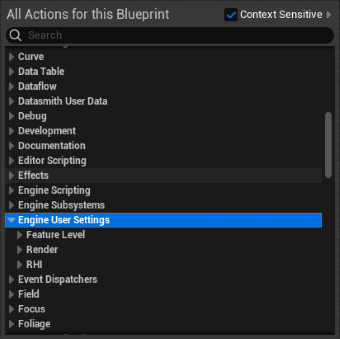
Static nodes and subsystem nodes
Every node lives in EngineUserSettingsSubsystem, a Game Instance Subsystem. There are two kinds:
| Kind | How to call it | Examples |
|---|---|---|
| Static | Call it directly, no reference needed. Works in menus and Editor Utility Widgets. | Rendering, shadows, Lumen, post processing, LOD, RHI, presets |
| Subsystem Subsystem | Needs the subsystem as Target: use Get Game Instance Subsystem with the class EngineUserSettingsSubsystem. | Upscaling, dynamic resolution, textures / VRAM, background, PSO progress, hardware info, Auto Configure |
Get Game Instance Subsystem
ClassEngineUserSettingsSubsystem
Return Value
How settings are saved
- Settings are applied immediately (except RHI and feature level, which need a restart).
- They're saved in
GameUserSettings.iniand reapplied when the game starts: console variables in[/Script/Engine.RendererSettings], the plugin's own settings in[/Script/EngineUserSettings.EngineUserSettingsConfig]. - Every value is clamped to a safe range, so a hand-edited ini file can't break the game.
- Getters return the value in effect, so a settings menu can read its initial state from them.
Reading the node diagrams
| Header color | Meaning |
|---|---|
| Blue | Callable function – has execution (white) pins and must be connected to the exec chain. |
| Green | Pure function – no execution pins, evaluated when its output is read. |
| Red | Event – fires when something happens. |
Pin colors follow Unreal's defaults: Boolean, Byte / Enum, Integer, Float, String, Struct, Object and Delegate.